»Scan Things is the quickest way to capture and save anything around you. Scan Things is available on iOS, iPadOS, and MacOS.«
Pocket is Saying Goodbye
»We’ve made the difficult decision to shut down Pocket on July 8, 2025. Thank you for being part of our journey over the years… «
Ladybird Browser
»Ladybird uses a brand new engine based on web standards, without borrowing any code from other browsers.«
[ladybird]
Nur 5: Desktop Apps
Nur 5: Desktop Apps
Beim iPhone überwiegt die Nutzung von Apps. Am Mac sieht mein Nutzungsverhalten von Software / Apps etwas anders aus. Hier kommt überwiegend der Internetz Browser Safari zum Einsatz. Trotzdem ist auch auf dem heimischen Rechner die eine oder andere App von Nöten. Hier meine Nur 5:
- Hyper – IMHO Terminal in besser
- Cyberduck – das Allzwecktool für (S)FTP, WebDAV und Co.
- Textastic – the Text Editor of Choice für HTML, CSS und Co.
- Reeder – mein RSS Reader der Wahl, immer schön synchronisiert mit iPhone und MacBook
- Apple Mail – auch am heimischen Dektop für die elektronische Post zuständig
Na, wie sieht es bei euren heimischen Rechenmaschinen aus? Was nutzt ihr so – neben dem Internetz Browser – für MacOS, Windows, Linux und was es sonst noch so gibt?
Nur 5: self-hosted software
Wo wir doch neulich mal wieder so vortrefflich über die Nur 5 Apps gefachsimpelt haben, kam mir folgende Idee: Warum dieses 5er Ding nicht auch auf andere Bereiche ausweiten?
Heute würde mich interessieren, welche Software ihr auf euren Servern, VPS oder heimischen Raspberry PIs (oder ähnliche Wohnungsmaschinen) am laufen habt. Natürlich wieder die 5 – für euch – Wichtigsten niederschreiben … Danke!
Bei mir sieht es so aus:
- GoToSocial – meine kleine Fediverse-Ecke (@b30)
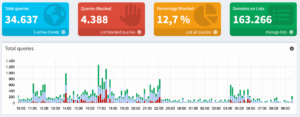
- Pi-hole – das Bermuda-Dreieck für Werbung
- Miniflux – Futter für den RSS-Reeder (Classic)
- linkding – Self-hosted bookmark manager in ganz minimal
- Vaultwarden – die heimische Passworthalde
… und bei euch? #rinjehaun
Nur 5 Apps! 2025 Edition
Damals™️, im Jahr 2022, wurde dieses Nur 5 Apps! Ding durch das soziale Internetz getrieben: »Wenn man sich nur 5 Apps auf seinem Smartphone installieren könnte bzw. dürfte, welche wären das?«
Meine Apps der Wahl waren 1. Apple Mail, 2. Bandcamp, 3. Bitwarden, 4. Mastodon und 5. Reeder. Mal schauen, wie es heute aka im Jahr 2025 aussieht:
- IceCubesApp (und GoToSocial) für die Ausflüge ins Fediverse (@b30)
- Reeder Classic (und Miniflux) für die RSS-Abos
- Apple Mail für die elektronische Post
- Bandcamp für die Unterwegsmukke
- Bitwarden (mit Vaultwarden) als Gedächtnisstütze für Hunderte von Log-ins
Na, wie schaut es bei Euch aus? #rinjehaun
Kuck mal, die Kollegen haben sich auch schon geäußert:
- Robert – nureinblog.at
- Tommi – jansens-pott.de
- John – rausgerufen.de
Sehr spannend … Danke!
Pi-hole v6 mit Unbound
Pi-hole v6 mit Unbound (Docker Compose)
Pi-hole wurde vor kurzem von Version 5 auf v6 gehievt. Vor dem Update muss man ein paar Sachen in der docker-compose.yml anpassen. Das ist in den Docs ganz gut beschrieben. Mein yaml-Dings für Pihole und Unbound sieht momentan so aus:
services:
pihole:
depends_on:
- unbound
image: pihole/pihole:latest
container_name: pihole
hostname: dns1
ports:
- 53:53/tcp
- 53:53/udp
- 8080:80/tcp
environment:
TZ: Europe/Berlin
FTLCONF_webserver_api_password: 'super-strong-password'
FTLCONF_dns_upstreams: 'unbound'
FTLCONF_dns_revServers: 'true,192.168.x.0/16,192.168.x.1,fritz.box'
volumes:
- ./pihole_etc:/etc/pihole
- ./pihole_dnsmasq:/etc/dnsmasq.d
restart: unless-stopped
unbound:
container_name: unbound
restart: unless-stopped
image: klutchell/unbound
networks:
default:
ipv4_address: 172.x.0.53
networks:
default:
ipam:
config:
- subnet: 172.x.0.0/24
Läuft alles sehr geschmeidig und voll fluffig im heimischen Internetz.
gts41.win – GoToSocial again
Ich finde, ihr solltet das wissen: Nach langer Pause habe ich mal wieder den GoToSocial Docker Container angeschmissen und dafür die schmissige Domain gts41.win registriert. Seit den letzten zwei Jahren hat sich viel getan und verbessert:
Mid 2023
Hashtags — implement federating hashtags and viewing hashtags to allow users to discover posts that they might be interested in. Mid/late 2023
Polls — implementing parsing, creating, and voting in polls.
Mute posts/threads — opt-out of notifications for replies to a thread; no longer show a given post in your timeline.
Limited peering/allowlists — allow instance admins to limit federation with other instances by default.Early 2024
Move activity — use the ActivityPub Move activity to support migration of a user’s profile across servers.
Sign-up flow — allow users to submit a sign-up request to an instance; allow admins to moderate sign-up requests.
Das sieht doch alles voll schnafte aus! Ich teste meine GTS Instanz gts41.win mit Elk, feditext und Ice Cubes. Läuft!

docker-compose.yml
services:
gotosocial:
image: superseriousbusiness/gotosocial:latest
container_name: gotosocial
user: 1000:1000
networks:
- gotosocial
environment:
# Change this to your actual host value.
GTS_HOST: example.org
GTS_DB_TYPE: sqlite
# Path in the GtS Docker container where
# the sqlite.db file will be stored.
GTS_DB_ADDRESS: /gotosocial/storage/sqlite.db
# Change this to true if you're not running
# GoToSocial behind a reverse proxy.
GTS_LETSENCRYPT_ENABLED: "false"
# Set your email address here if you
# want to receive letsencrypt notices.
GTS_LETSENCRYPT_EMAIL_ADDRESS: ""
# Path in the GtS Docker container where the
# Wazero compilation cache will be stored.
GTS_WAZERO_COMPILATION_CACHE: /gotosocial/.cache
## For reverse proxy setups:
# GTS_TRUSTED_PROXIES: "172.x.x.x"
## Set the timezone of your server:
#TZ: UTC
ports:
- "443:8080"
## For letsencrypt:
#- "80:80"
## For reverse proxy setups:
#- "127.0.0.1:8080:8080"
volumes:
# Your data volume, for your
# sqlite.db file and media files.
- ~/gotosocial/data:/gotosocial/storage
# OPTIONAL: To mount volume for the WAZERO
# compilation cache, for speedier restart
# times, uncomment the below line:
#- ~/gotosocial/.cache:/gotosocial/.cache
restart: "always"
networks:
gotosocial:
ipam:
driver: default
Die komplette Installations-Anleitung (Docker) gibt es hier: https://docs.gotosocial.org/en/latest/getting_started/installation/container/
Basics
GoToSocial ist eine quelloffene und dezentrale Plattform für Mikroblogging, die als Alternative zu kommerziellen Netzwerken wie Twitter entwickelt wurde. Sie ermöglicht Nutzern, eigene Server zu betreiben, die miteinander im Fediverse verbunden sind, wodurch ein offenes, föderiertes System entsteht. Mit Fokus auf Datenschutz, Nutzerkontrolle und einer minimalistischen Benutzeroberfläche ist GoToSocial ideal für alle, die soziale Netzwerke in einem unabhängigen und selbstbestimmten Rahmen nutzen möchten. Die Plattform wächst kontinuierlich und bietet zahlreiche Integrationsmöglichkeiten mit anderen dezentralen Diensten.
Wallos: Personal Subscription Tracker
Wallos ist ein hilfreiches Tool, um deine Abonnements übersichtlich zu verwalten. Ob Streaming-Dienste, Software-Abos oder Fitness-Mitgliedschaften – Wallos hilft dir, Kosten, Zahlungsfristen und Laufzeiten im Blick zu behalten. Mit einer einfachen Benutzeroberfläche kannst du Abos schnell hinzufügen und wirst rechtzeitig an bevorstehende Zahlungen erinnert. So behältst du nicht nur die Kontrolle über deine Finanzen, sondern vermeidest auch unerwartete Abbuchungen. Wallos ist die ideale Lösung für alle, die ihre Abos unkompliziert und effizient organisieren möchten.
Aber nicht erschrecken! Mit Wallos wird einem das finanzielle Desaster der Abo-Modelle direkt und knallhart angezeigt.
Installation mit Docker Compose
Wallos lässt sich ganz lässig mit Docker Compose installieren:
services:
wallos:
container_name: wallos
image: bellamy/wallos:latest
ports:
- "8282:80/tcp"
environment:
TZ: 'Europe/Berlin'
# Volumes store your data between container upgrades
volumes:
- './db:/var/www/html/db'
- './logos:/var/www/html/images/uploads/logos'
restart: unless-stopped
fediverse:creator (meta) tags
Die fediverse:creator (meta) tags habe ich heute früh das erste mal bewusst bei einem Heise-Beitrag bemerkt. Nach einer kurzen Recherche strandete ich bei folgendem Zitat:
»You will notice that underneath some links shared on Mastodon, the author byline can be clicked to open the author’s associated fediverse account, right in the app. This highlights writers and journalists that are active on the fediverse, and makes it easier than ever to follow them and keep up with their future work—potentially across different publications […]«
Gleich mal hier ins Internetz Tagebuch gedengelt …

… und dann mal schauen, was passiert. #rinjehaun